
本文目标是分析AIO水冷冷头屏幕和上位机的通信方式,并自行实现驱动服务替换制造商提供的管理软件。如果要起个轻小说标题,那应该是——
《VK你能不能别光惦记着往产品包装上画AI油腻小人而是改改你那个自启弹UAC再读好半天条里面还捆绑点神秘小软件的愚蠢软件不要恶心到我花好几天绕过它》
绝对不是因为Homelab系列难产一年了来写点片汤话充数喵
初步信息收集
——我本来是想这么说的,可是他给的线索实在是太多了。
初步探索厂商灯控软件,在设置里找到了”查看设备连接日志“,基本可以确定。使用procmon查到实际写入位置为$env:LOCALAPPDATA\MythCool\OtherLogs\MythCool.exe_MSDisplayAddon.node_PID.log,内容如下:
================== Start Log:2025-09-07 16:39:02  ==================
Process Information
PID: 3912
EXE: C:\Program Files (x86)\Myth.Cool\MythCool.exe
================================================================================================================================================

2025-09-07 16:39:02   INFO    Scanning in msdisplay...
2025-09-07 16:39:02   INFO    The number of devices for MSDisplay is 0
2025-09-07 16:39:02   INFO    Microsoft PnP Utility

<libusb driver infos>

2025-09-07 16:39:02   INFO    libusb driver has been installed!
2025-09-07 16:39:02   INFO    MSDevice Config:
--------------------
vic: 143 polarity: 7 htotal: 600 vtotal: 490 hactive: 480 vactive: 480 pixclk: 1764 vfreq: 6000 hoffset: 100 voffset: 8 hsyncwidth: 50 vsyncwidth: 4
--------------------
vic: 147 polarity: 7 htotal: 452 vtotal: 568 hactive: 240 vactive: 320 pixclk: 1540 vfreq: 6000 hoffset: 190 voffset: 260 hsyncwidth: 5 vsyncwidth: 20
--------------------
vic: 148 polarity: 7 htotal: 568 vtotal: 452 hactive: 320 vactive: 240 pixclk: 1540 vfreq: 6000 hoffset: 206 voffset: 190 hsyncwidth: 20 vsyncwidth: 5
--------------------
vic: 156 polarity: 7 htotal: 640 vtotal: 352 hactive: 240 vactive: 240 pixclk: 1350 vfreq: 6000 hoffset: 190 voffset: 51 hsyncwidth: 10 vsyncwidth: 10
--------------------
vic: 160 polarity: 7 htotal: 544 vtotal: 996 hactive: 360 vactive: 960 pixclk: 3263 vfreq: 6000 hoffset: 102 voffset: 33 hsyncwidth: 40 vsyncwidth: 10
--------------------
vic: 159 polarity: 7 htotal: 600 vtotal: 375 hactive: 480 vactive: 272 pixclk: 1350 vfreq: 6000 hoffset: 100 voffset: 90 hsyncwidth: 50 vsyncwidth: 5
--------------------
2025-09-07 16:39:02   INFO    MSDisplay start return code: 0
2025-09-07 16:39:04   INFO    MSDISPLAY_DEVICE_ATTACH_ADDON
2025-09-07 16:39:04   INFO    Resolution:
--------------------
handle: 14526976
width: 800
height: 600
refresh: 60
--------------------
--------------------
handle: 14526976
width: 480
height: 480
refresh: 60
--------------------
--------------------
handle: 14526976
width: 320
height: 240
refresh: 60
--------------------
--------------------
handle: 14526976
width: 240
height: 320
refresh: 60
--------------------
2025-09-07 16:39:04   INFO    resolution count: 4
2025-09-07 16:39:04   INFO    The device with handle: 14526976 has been attached. Total number of loaded devices is: 1.
2025-09-07 16:39:04   INFO    MSDisplay start ReadFlash handle: 14526976
2025-09-07 16:39:04   INFO    MSDisplay MSDisplayReadFlash Success!
2025-09-07 16:39:04   INFO    SN: MCVKA030320*0240REDACTEDSN
2025-09-07 16:39:04   INFO    MSDisplay ReadFlash Success SN: MCVKA030320*0240REDACTEDSN. handle: 14526976
2025-09-07 16:39:04   INFO    DisplayAddVideoParam Enter handle:14526976, width:320, height:240, refresh:60
2025-09-07 16:39:04   INFO    DisplayAddVideoParam Insert handle:14526976, width:320, height:240, refresh:60
2025-09-07 16:39:04   INFO    DisplayAddVideoParam Leave handle:14526976, width:320, height:240, refresh:60
2025-09-07 16:39:04   INFO    Set video param width:  320 height: 240 refresh: 60
2025-09-07 16:40:14   INFO    DisplayStop: Enter
2025-09-07 16:40:14   INFO    StopDisplay: Enter
2025-09-07 16:40:14   INFO    StopDisplay: Leave
2025-09-07 16:40:14   INFO    DisplayStopSendPicture: MSDisplay has no device!
2025-09-07 16:40:15   INFO    MSDisplay has stopped!
2025-09-07 16:40:15   INFO    DisplayStop: Leave
2025-09-07 16:40:15   INFO    DisplayStop: Enter
2025-09-07 16:40:15   INFO    MSDisplay has been stopped.
2025-09-07 16:40:15   INFO    MSDisplay has stopped!
2025-09-07 16:40:15   INFO    DisplayStop: Leave
根据日志信息进一步分析,我们可以得到如下信息:
- 厂商软件使用electron,实际连接行为与
MSDisplayAddon.node有关。 - 该Addon实际为包含特殊导出表的32位DLL,位于安装包
Apps\mainxxxx\version\win32\msdisplay,安装时被释放到LocalAppData - 顺MSDisplay找到了MindShow/USBDisplay。设备管理器USB VID=0x345f PID=0x9132,该屏幕应该使用了来自Ultrasemi的MS9132,和便宜采集卡常用的的MS2130/1同门。
实际这份日志的价值不止于此,稍后分析调用时我们还会用到。
Addon分析
IDA加载MSDisplayAddon.node,搜索任意函数名如MSDisplayReadFlash即可定位到N-API真正创建导出表的方法。看了下基本没有任何混淆,分析和重命名方法直接ida-pro-mcp丢给Claude。Claude二进制看得是真的快,但是非常喜欢乱编各种方法的参数和功能。例如看到了驱动内部使用三个缓冲区轮换就认为一帧应发送三次、在分析中看到了RGBA8888转RGB565不经分析就假设API接受565。建议在让LLM逆向的时候,prompt中强调不允许使用猜测作为分析结果。
把前文日志丢给LLM,要求在Addon中搜索日志内容并分析方法时序,可以分析得到期望的调用流程如下:
初始化
- MSDisplay.DisplayStart(configs) – 传入VIC配置数组
- MSDisplay.Start(callback) – 监听设备事件
- 等待回调中的 event.handle
配置显示
- MSDisplay.DisplayAddVideoParam(handle, width, height, refresh)
- MSDisplay.DisplaySetVideoParam(handle)
- MSDisplay.DisplaySendPicture(width, height, handle)
显示数据
- 创建RGBA32格式的Buffer
- MSDisplay.PushData(buffer, width, height, handle) – 推送图像数据
清理资源
- MSDisplay.DisplayStopSendPicture(handle)
- MSDisplay.DisplayStop()
- MSDisplay.Stop()
参数说明
- handle: 设备句柄(从Start回调获取)
- width/height: 图像尺寸(如320×240)
- refresh: 刷新率(如60)
- buffer: RGBA32图像数据Buffer
- configs: VIC配置数组
- callback: 设备事件回调函数
其实这里更普适的做法应该是分析原electron应用或者hook得到调用顺序及参数,本次因函数数量较少且可以从命名、日志及静态分析推断,选择直接猜测流程。
假设检验
\😭/ \😭/ \😭/
基于上一节的分析,不难实现如下简单的验证脚本:从指定路径加载视频,用核显硬件加速解码,连接到显示屏并逐帧推送图像。
// 精简流式视频播放器
const MSDisplay = require('./MSDisplayAddon.node');
const { spawn } = require('child_process');
const fs = require('fs');
const path = require('path');
const os = require('os');

let deviceHandle = null;
let isPlaying = false;
let ffmpegProcess = null;
let playLoopTimer = null;
let watchDogTimer = null;
let serialNumber = null;
let preferredVendorId = '0x1002'; // AMD的Vendor ID
let logStream = null;
let startTime = Date.now();

// 互斥体和FFmpeg进程管理
const lockFilePath = path.join(os.tmpdir(), 'msdisp_video_player.lock');
const ffmpegPidsPath = path.join(os.tmpdir(), 'msdisp_ffmpeg_pids.txt');
const logsDir = path.join(__dirname, 'logs');

// 日志系统
function initLogger() {
    if (!fs.existsSync(logsDir)) fs.mkdirSync(logsDir, { recursive: true });
    const ts = new Date().toISOString().replace(/[:.]/g, '-').slice(0, -5);
    const logPath = path.join(logsDir, `video_${process.pid}_${ts}.log`);
    logStream = fs.createWriteStream(logPath, { flags: 'a' });
    const log = console.log, err = console.error;
    console.log = (...a) => { const m = `[${new Date().toISOString()}] ${a.join(' ')}`; log(...a); logStream?.write(m + '\n'); };
    console.error = (...a) => { const m = `[${new Date().toISOString()}] [ERROR] ${a.join(' ')}`; err(...a); logStream?.write(m + '\n'); };
    console.log(`📝 日志: ${logPath}`);
}

function closeLogger() { logStream?.end(); logStream = null; }

// 互斥锁
function acquireLock() {
    if (fs.existsSync(lockFilePath)) {
        const oldPid = parseInt(fs.readFileSync(lockFilePath, 'utf8'));
        try {
            process.kill(oldPid, 0);
            console.error('❌ 程序已运行 (PID:', oldPid, ')'); process.exit(1);
        } catch { console.log('⚠️ 清理过期锁 (PID:', oldPid, ')'); fs.unlinkSync(lockFilePath); }
    }
    try {
        const fd = fs.openSync(lockFilePath, 'wx');
        fs.writeSync(fd, process.pid.toString()); fs.closeSync(fd);
        console.log(`✅ 获取锁 (PID: ${process.pid})`);
    } catch (e) {
        console.error('❌ 无法获取锁:', e.code === 'EEXIST' ? '已运行' : e.message); process.exit(1);
    }
}

function releaseLock() {
    try { if (fs.existsSync(lockFilePath)) fs.unlinkSync(lockFilePath); } catch { }
    try { if (fs.existsSync(ffmpegPidsPath)) fs.unlinkSync(ffmpegPidsPath); } catch { }
}

// FFmpeg PID管理
function saveFFmpegPid(pid) {
    const pids = loadFFmpegPids(); pids.add(pid);
    const tmp = ffmpegPidsPath + '.tmp';
    fs.writeFileSync(tmp, Array.from(pids).join('\n'), 'utf8');
    fs.renameSync(tmp, ffmpegPidsPath);
    console.log(`📌 FFmpeg PID: ${pid} (共${pids.size}个)`);
}

// 加载FFmpeg PID列表
function loadFFmpegPids() {
    const pids = new Set();
    if (fs.existsSync(ffmpegPidsPath)) {
        fs.readFileSync(ffmpegPidsPath, 'utf8').split('\n').forEach(l => {
            const p = parseInt(l.trim()); if (p) pids.add(p);
        });
    }
    return pids;
}

// 清理旧FFmpeg进程
function cleanupOldFFmpegProcesses() {
    const pids = loadFFmpegPids();
    if (pids.size === 0) return;
    console.log(`🧹 清理 ${pids.size} 个旧FFmpeg...`);
    let cnt = 0;
    pids.forEach(p => { try { process.kill(p, 'SIGKILL'); cnt++; console.log(`  ├─ PID ${p}`); } catch { } });
    try { fs.unlinkSync(ffmpegPidsPath); console.log(`✅ 已清理 ${cnt}/${pids.size} 个`); } catch { }
}

// 设备事件处理
function handleDeviceEvent(event) {
    if (event.type === 0) { // 设备连接
        if (!isPlaying) {
            deviceHandle = event.handle;
            startDisplayAndPlay(event);
        }
    } else if (event.type === 1) { // 设备断开
        stopDisplayAndPlay();
    }
}

async function startDisplayAndPlay(event) {
    try {
        console.log('🔌 设备连接, 开始播放。');
        MSDisplay.DisplayAddVideoParam(event.handle, 320, 240, 60);
        await MSDisplay.DisplaySetVideoParam(event.handle);
        MSDisplay.DisplaySendPicture(320, 240, event.handle);
        isPlaying = true;
        startFFmpegAndPlay();
    } catch (e) {
        console.error('显示启动失败:', e.message);
    }
}

function stopDisplayAndPlay() {
    isPlaying = false;
    if (ffmpegProcess) ffmpegProcess.kill();
    if (playLoopTimer) clearTimeout(playLoopTimer);
    if (watchDogTimer) clearTimeout(watchDogTimer);
    setTimeout(() => {
        console.log('🛑 设备断开,停止播放......');
    }, 100);
}

function startFFmpegAndPlay() {
    const videoPath = '.\\v240.mp4';
    startFFmpeg(videoPath, preferredVendorId);
    playVideo();
}

// 检测适配器
async function findAdapter(vendorId = '0x1002') {
    let success = false;
    try {
        const ffmpeg = spawn('ffmpeg', [
            '-hide_banner', '-v', 'verbose',
            '-init_hw_device', `d3d11va=hwacc:,vendor_id=${vendorId}`,
            '-f', 'lavfi', '-i', 'nullsrc=size=16x16',
            '-t', '0.1', '-f', 'null', '-'
        ]);

        let stderr = '';
        ffmpeg.stderr.on('data', (data) => stderr += data);

        await new Promise((resolve, reject) => {
            ffmpeg.on('close', (code) => {
                if (code !== 0) return reject();

                const match = stderr.match(/Using device ([0-9a-fA-F:]+)\s+\((.+)\)\./i);
                if (match) {
                    console.log(`✅ Found hwaccel device: ${match[2]} (${match[1]})`);
                    resolve(vendorId);
                } else {
                    reject();
                }
            });
            ffmpeg.on('error', reject);
        });
        success = true;
    } catch { }
    return success ? vendorId : null;

}

// 启动FFmpeg
function startFFmpeg(videoPath, preferredVendorId = null) {
    const hwArgs = preferredVendorId ? ['-init_hw_device', `d3d11va=hwacc:,vendor_id=${preferredVendorId}`,
        '-hwaccel', 'd3d11va', '-hwaccel_device', 'hwacc', '-filter_hw_device', 'hwacc', '-hwaccel_output_format', 'd3d11'] : [];
    const vf = (preferredVendorId ? 'hwdownload,format=nv12,' : '') + 'scale=320:240:force_original_aspect_ratio=increase,crop=320:240,pad=320:240:(ow-iw)/2:(oh-ih)/2:black';
    const args = ['-re', '-stream_loop', '-1', ...hwArgs, '-i', videoPath, '-vf', vf, '-pix_fmt', 'bgra', '-f', 'rawvideo', '-r', '30', '-'];

    console.log(`🚀 FFmpeg启动 (${preferredVendorId ? `硬件 ${preferredVendorId}` : '软件'})`);
    ffmpegProcess = spawn('ffmpeg', args);
    const pid = ffmpegProcess.pid;
    saveFFmpegPid(pid);
    console.log(`  └─ PID: ${pid}`);

    // 延迟清理旧进程
    setTimeout(() => {
        const old = loadFFmpegPids(); old.delete(pid);
        if (old.size > 0) {
            console.log(`🧹 回收 ${old.size} 个旧FFmpeg...`);
            old.forEach(p => { try { process.kill(p, 'SIGKILL'); console.log(`  ├─ PID ${p}`); } catch { } });
            const tmp = ffmpegPidsPath + '.tmp';
            fs.writeFileSync(tmp, pid.toString(), 'utf8');
            fs.renameSync(tmp, ffmpegPidsPath);
            console.log(`✅ 完成,当前PID: ${pid}`);
        }
    }, 500);

    ffmpegProcess.on('close', (code) => {
        if (!isPlaying) { console.log(`🛑 FFmpeg退出 (PID: ${pid})`); return; }
        if (code !== 0) {
            if (preferredVendorId && code === 1) {
                console.log('⚠️ 硬件加速失败,回退软件解码');
                setTimeout(() => startFFmpeg(videoPath, null), 1000);
            } else {
                console.log(`⚠️ FFmpeg异常退出 (code: ${code}),重启中`);
                setTimeout(() => startFFmpeg(videoPath, preferredVendorId), 2000);
            }
        }
    });
    return ffmpegProcess;
}


// 播放视频
function playVideo() {
    const frameSize = 320 * 240 * 4;
    let frameBuffer = Buffer.alloc(0);
    const frameQueue = [];
    const statisticsQueue = [];
    let frameCount = 0;
    let lastFfmpegFrameTime = Date.now(); // 初始为now,避免首帧特殊处理

    // 处理视频数据
    ffmpegProcess.stdout.on('data', (data) => {
        frameBuffer = Buffer.concat([frameBuffer, data]);

        while (frameBuffer.length >= frameSize) {
            const frameData = frameBuffer.subarray(0, frameSize);
            frameBuffer = frameBuffer.subarray(frameSize);
            const now = Date.now();
            let ffmpegInterval = now - lastFfmpegFrameTime;
            lastFfmpegFrameTime = now;

            // 添加到队列
            if (frameQueue.length < 10) {
                frameQueue.push({
                    data: frameData,
                    timestamp: now,
                    ffmpegInterval
                });
            }
        }
    });

    // 播放循环
    const playLoop = () => {
        if (!isPlaying) return;

        if (frameQueue.length > 0) {
            const frame = frameQueue.shift();
            const playTime = Date.now();
            const delay = playTime - frame.timestamp;

            try {
                MSDisplay.PushData(frame.data, 320, 240, deviceHandle);
                frameCount++;
                statisticsQueue.push({ delay, timestamp: playTime, ffmpegInterval: frame.ffmpegInterval });
            } catch (error) {
                console.log(`播放错误: ${error.message}`);
            }
        }

        playLoopTimer = setTimeout(playLoop, 10);
    };

    const watchDogLoop = () => {
        if (!isPlaying) return;
        // 降低诊断频率:改为30秒
        if (statisticsQueue.length > 2 && (Date.now() - statisticsQueue[0].timestamp) > 30000) {
            const stats = statisticsQueue.splice(0, statisticsQueue.length - 1);

            const avgDelay = stats.reduce((sum, item) => sum + item.delay, 0) / stats.length;
            const maxDelay = Math.max(...stats.map(i => i.delay));
            const minDelay = Math.min(...stats.map(i => i.delay));
            const tDiff = stats[stats.length - 1].timestamp - stats[0].timestamp;
            const actualFPS = ((stats.length - 1) / tDiff) * 1000;
            // 统计ffmpeg帧间隔
            const ffmpegIntervals = stats.map(i => i.ffmpegInterval);
            const ffmpegIntervalAvg = ffmpegIntervals.reduce((a, b) => a + b, 0) / ffmpegIntervals.length;
            const ffmpegIntervalMax = Math.max(...ffmpegIntervals);
            const ffmpegIntervalMin = Math.min(...ffmpegIntervals);

            const uptime = Math.floor((Date.now() - startTime) / 1000);
            console.log(`📊 [运行${uptime}s] 帧:${frameCount} FPS:${actualFPS.toFixed(1)} 延迟:${minDelay}|${avgDelay.toFixed(1)}|${maxDelay}ms 缓冲:${frameQueue.length} FFmpeg间隔:${ffmpegIntervalMin}|${ffmpegIntervalAvg.toFixed(1)}|${ffmpegIntervalMax}ms`);
        }
        // 用lastFfmpegFrameTime替代ffmpegLastUptime
        if (lastFfmpegFrameTime && (Date.now() - lastFfmpegFrameTime) > 800) {
            console.log('⚠️ FFmpeg无响应超过800ms,重启中...');
            if (ffmpegProcess) ffmpegProcess.kill();
        }
        watchDogTimer = setTimeout(watchDogLoop, 500);
    };

    playLoop();
    watchDogTimer = setTimeout(watchDogLoop, 1000);
}


// 检测序列号和硬件加速,只做一次
async function detectSerialAndAccel() {
    // 1. 设备连接并读取序列号
    MSDisplay.DisplayStart([]);
    let handle = null;
    await new Promise(resolve => {
        MSDisplay.Start((event) => {
            if (event?.handle) {
                handle = event.handle;
                resolve();
            }
        });
    });
    let sn = null;
    try {
        const data = MSDisplay.DisplayReadFlash(handle);
        const match = data.toString('ascii').match(/[A-Za-z0-9*]+/);
        if (match) sn = match[0];
    } catch { }
    if (!sn) return Promise.reject(new Error('无法读取设备序列号,请检查连接'));
    console.log(`✅ 读取到设备序列号: ${sn}`);
    MSDisplay.DisplayStop();
    MSDisplay.Stop();
    await new Promise(r => setTimeout(r, 200));
    // 2. 检测硬件加速
    let vendor = preferredVendorId;
    if (await findAdapter(vendor) !== vendor) {
        console.log('⚠️ 未找到硬件加速,使用软件解码');
        vendor = null;
    }
    return { serialNumber: sn, preferredVendorId: vendor };
}

// 主函数
async function main() {
    initLogger();
    acquireLock();
    cleanupOldFFmpegProcesses();

    const videoPath = '.\\v240.mp4';
    if (!fs.existsSync(videoPath)) {
        console.error('❌ 视频文件不存在:', videoPath);
        releaseLock(); closeLogger(); process.exit(1);
    }

    try {
        const detectResult = await detectSerialAndAccel();
        serialNumber = detectResult.serialNumber;
        preferredVendorId = detectResult.preferredVendorId;

        MSDisplay.DisplayStart([{ sn_code: serialNumber, vic: 148, polarity: 7, htotal: 568, vtotal: 452, hactive: 320, vactive: 240, pixclk: 1540, vfreq: 6000, hoffset: 206, voffset: 190, hsyncwidth: 20, vsyncwidth: 5 }]);
        MSDisplay.Start(handleDeviceEvent);
        console.log('⏳ 事件循环启动,等待设备...');

        const gracefulExit = () => {
            console.log('\n🛑 退出信号,清理中...');
            isPlaying = false;
            if (ffmpegProcess) { console.log(`  ├─ 终止FFmpeg (${ffmpegProcess.pid})`); ffmpegProcess.kill(); }
            if (playLoopTimer) clearTimeout(playLoopTimer);
            if (watchDogTimer) clearTimeout(watchDogTimer);
            try { MSDisplay.DisplayStop(); MSDisplay.Stop(); console.log('  ├─ 停止MSDisplay'); } catch { }
            cleanupOldFFmpegProcesses();
            releaseLock(); closeLogger();
            console.log('✅ 清理完成'); process.exit(0);
        };
        ['SIGINT', 'SIGTERM', 'SIGHUP'].forEach(s => process.on(s, gracefulExit));

        process.on('uncaughtException', (e) => { console.error('❌ 异常:', e); cleanupOldFFmpegProcesses(); releaseLock(); closeLogger(); process.exit(1); });
        process.on('unhandledRejection', (r) => { console.error('❌ Promise拒绝:', r); cleanupOldFFmpegProcesses(); releaseLock(); closeLogger(); process.exit(1); });

        setInterval(() => { }, 1000);
    } catch (error) {
        console.error('❌ 错误:', error.message);
        cleanupOldFFmpegProcesses(); releaseLock(); closeLogger(); process.exit(1);
    }
}

if (require.main === module) main();1. 安装32bit nodejs,个人建议使用NVM For Windows,
nvm install lts 32 && nvm use lts 32。2. 安装ffmpeg,笔者直接
choco install ffmpeg装的。虽然choco的版本好像没编vulkan加速,但是d3d11va也不是不能用。3. 提取
MSDisplayAddon.node,置于脚本同级目录。希望播放的视频置于脚本同级目录。(虽然ffmpeg会承受一切,但是就算是为了你的硬件好,请先把视频压到期望分辨率)4. 修改
videoPath;修改preferredVendorId (这个是用来指定硬件解码加速的,为了用核显我写了AMD的vendor id)实际测试平均帧延迟13.7ms,TP99=15ms,算是勉强守住了60fps的最高刷新率。
把下面这个玩意丢到C:\ProgramData\Microsoft\Windows\Start Menu\Programs\Startup,理论上它应该就可以默默在后台工作了。至少笔者测试了一周,睡眠后恢复和开机自启都没什么毛病。偶尔ffmpeg会犯病卡死,不清楚为什么,但总之会因为超时被kill掉自动重启。
Update 20260202: 原来的版本在死机的时候不知道为什么会拉一坨僵尸ffmpeg进程,新加了个锁和清理机制。
Dim objShell
Set objShell = WScript.CreateObject("WScript.Shell")
objShell.CurrentDirectory = "C:\path\to\your\folder"
objShell.Run("cmd.exe /c ""nvm use 22.20.0 32 && node video.js >> msdisp.log 2>&1"""), 0
Set objShell = Nothing
没什么意义的效果展示,视频是我从wallpaper engine随便毛来的。
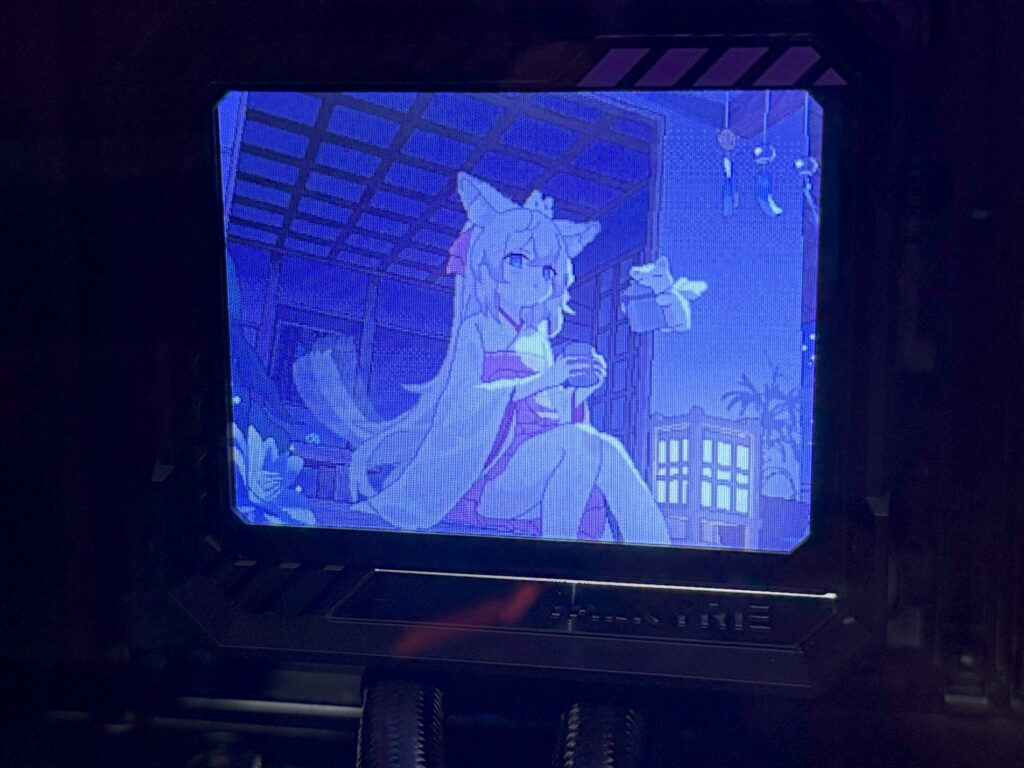
到这里,这个小项目最开始的目标已经达成了。考虑到显示器数量和机箱位置,笔者不需要也不太能从冷头看硬件监测数据;纯粹不想让这个溢价小配件闲着所以想要放点待机动画。
不过更多人应该是希望将它接入到其他支持显示屏的监控软件如AIDA64或InfoPanel的。考虑到让这些软件多加个nodejs运行时不太现实,我们需要一个dll。大体路线是要不然需要根据linux驱动自己实现一个用libusb0的win驱动,要不然想办法把node addon里面各种被napi包了一层但没导出的函数都导出了。
后记
其实笔者曾经尝试过自行实现一版驱动,但经过连续三个没什么进展的周末之后我决定先搁置它。大概是POC能跑通之后手就不想动了,我决定move on到草稿箱里剩下的十篇草稿。骗你的,是move on到摸鱼了~
之前看有些人会专门买古老的电子相册给电脑当监控屏,似乎是看重它usb连接、不会被windows识别为显示器的特性。现在看来成本也不算高?MS9132带配套器件成本50元,各种1080p笔记本拆机屏幕带驱动板也值不了多少。或许某些做高定Mod的商家会感兴趣这套吧,给不差钱的富哥侧透换成LED屏然后接入监控软件或者放点动画什么的。不过分辨率高了开销未知;而且如果不能让Windows识别到的话,搞不好得自己写vulkan做加速……
罢了,不想了。如果是五年前的我一定会试试,但是现在的我已经只会开摆了。就这样~
https://github.com/Fakinvisibility/b360gt-driver
可以 有这个想法在网上搜到这个了 可以不用自己分析了